
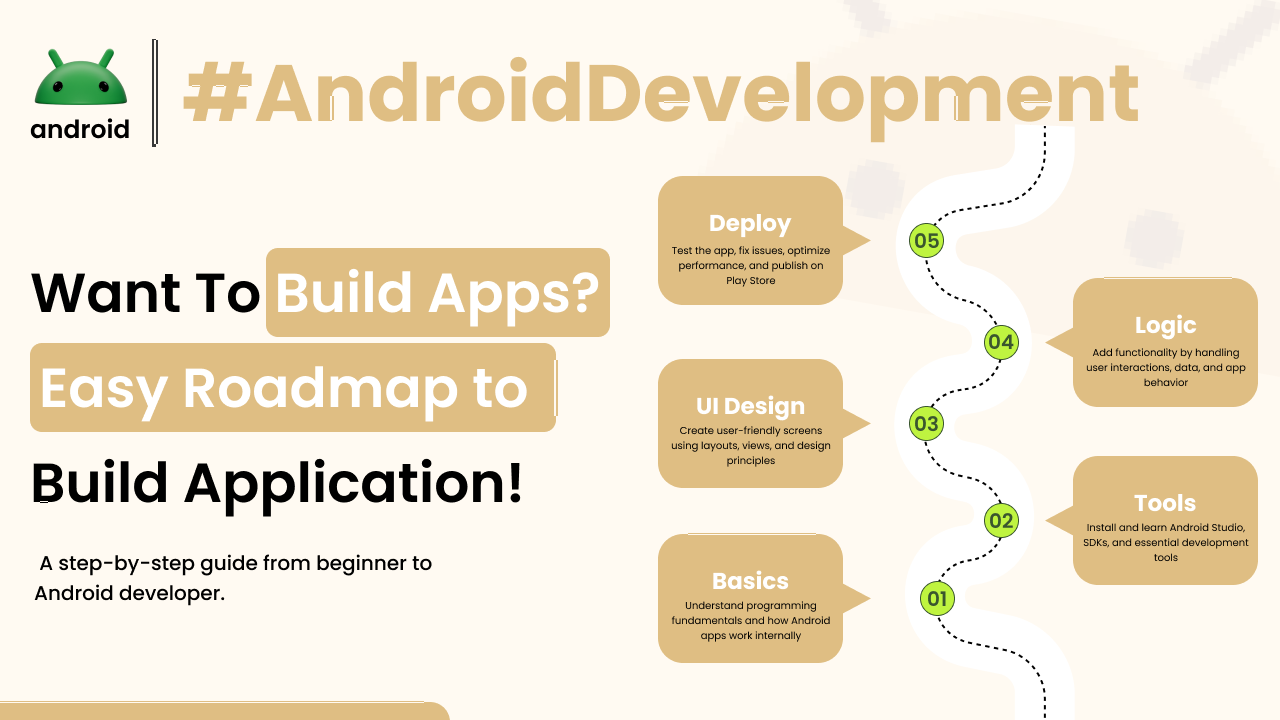
Embarking on the journey of Android development can seem a bit daunting at first. It’s like looking at a new city map – lots of streets and buildings, and you’re not quite sure where to start. But with a clear roadmap, you can navigate this exciting landscape step by step.
This guide is designed to lay out a practical path for anyone looking to dive into creating Android apps. We’ll skip the jargon and focus on what you actually need to learn and in what order, drawing from real-world experience.
Laying the Foundation: Essential Skills Before Coding
Before you even think about writing your first line of code, there are some fundamental concepts that will make your learning process much smoother. Think of these as the building blocks.
Understanding Programming Concepts
Programming, at its heart, is about giving instructions to a computer. You’ll encounter terms like variables, data types, loops, and conditional statements. These are the universal tools of programming.
For example, a variable is like a labeled box where you can store information, say, a user’s name. A loop is like telling your phone to do something repeatedly, like checking for new messages every minute. Understanding these basic ideas is crucial, no matter the programming language you choose.
Choosing Your First Programming Language
For Android development, the two primary languages are Java and Kotlin. Both are powerful, but Kotlin is often recommended for beginners due to its conciseness and modern features.
Kotlin feels a bit more intuitive for many. It requires less code to achieve the same results as Java, which can be less intimidating when you’re just starting out. Imagine writing a recipe – Kotlin might let you write it in fewer, clearer steps.
Setting Up Your Development Environment
To start building apps, you need a specific set of tools. The most important one is Android Studio, the official Integrated Development Environment (IDE) provided by Google.
Android Studio is like your all-in-one workshop. It includes everything you need: a code editor, debugging tools, and a way to test your apps on virtual devices or your own phone. Installing and getting familiar with Android Studio is your first major practical step.
The Core of Android Development: Building Blocks and UI
Once your environment is set up and you have a grasp of your chosen language, you can begin exploring the specifics of Android development. This involves understanding how to build the user interface and how your app will function.
Understanding Android’s Architecture
Android apps are built using components like Activities, Fragments, Services, and Broadcast Receivers. Each plays a specific role in how your app runs and interacts with the device and other apps.
An Activity, for instance, is what you typically see on the screen – like the main screen of a weather app showing the forecast. Learning how these pieces fit together is key to building stable and efficient applications.
Designing User Interfaces (UI)
Making an app look good and easy to use is just as important as its functionality. Android uses XML to define the layout of your app’s screens. You’ll be working with elements like buttons, text fields, and images.
Think about the apps you use daily. Their clean layouts and intuitive navigation don’t happen by accident. They are carefully designed using layout files that specify where each element goes. Android Studio provides visual tools to help you design these layouts, making it easier to see your creations come to life.
Working with User Input and Data
Apps need to respond to user actions and often need to store or retrieve data. This means learning about event handling (like what happens when a button is tapped) and data persistence.
When you tap a “like” button on social media, your app needs to register that tap and update accordingly. You’ll also learn about different ways to save data, whether it’s temporary information or something more permanent, like user preferences.
Intermediate Steps: Adding Functionality and Polish
With the basics covered, you can start building more complex features and refining your app’s performance. This stage is about making your apps more robust and user-friendly.
Navigating Between Screens
Most apps aren’t just a single screen. You’ll need to guide users between different parts of your application. This involves understanding Android’s navigation components.
Consider switching from a list of products to a detailed view of a single product. You need a way to transition smoothly from one screen to another, passing relevant information along the way. This is where navigation becomes essential.
Working with Data and Networking
Many modern apps need to fetch information from the internet, like news feeds, weather updates, or product catalogs. This involves learning about networking libraries and handling asynchronous operations.
When you open a news app, it doesn’t have all the articles stored locally. It fetches them from a server. You’ll learn how to make these requests and display the data in your app without freezing the user interface.
Understanding Background Operations
Sometimes, tasks need to run in the background without interrupting the user, such as downloading a large file or syncing data. Android provides mechanisms for managing these operations efficiently.
For instance, if an app is downloading a new set of map tiles, you want it to continue even if you switch to another app. Learning about background services and work managers helps you achieve this without draining the device’s battery.
Advanced Concepts and Best Practices
As you gain more experience, you’ll want to delve into more advanced topics and adopt best practices to ensure your apps are well-written, maintainable, and performant.
Testing Your Applications
Writing code is only half the battle; ensuring it works correctly is the other. You’ll learn about different types of testing, including unit tests and instrumented tests, to catch bugs early.
Imagine building a calculator app. You’d want to test if `2 + 2` truly equals `4` and if edge cases like dividing by zero are handled properly. Automated testing saves a lot of manual effort and improves app quality.
Performance Optimization
A fast, responsive app is a joy to use. You’ll learn techniques to identify and fix performance bottlenecks, ensuring your app runs smoothly even on less powerful devices.
This might involve optimizing image loading, reducing memory usage, or making your database queries more efficient. Good performance is a hallmark of a well-crafted application.
Staying Updated with Android Versions
The Android ecosystem is constantly evolving with new versions and features being released regularly. Keeping up-to-date with these changes is important for leveraging the latest capabilities and maintaining compatibility.
Google provides extensive documentation and resources for developers. Understanding how to migrate your apps to new Android versions and adopt new APIs is part of the continuous learning process in Android development.
Final Conclusion
The path to becoming an Android developer is a progressive one, built on understanding foundational programming concepts, mastering Android Studio, and gradually exploring the various components and features of the platform. Start with the basics of Java or Kotlin, get comfortable with Android Studio, and then build your knowledge layer by layer, from UI design to background operations and testing. The journey involves continuous learning and practice, but by following a structured roadmap, you can confidently develop your own Android applications.